QuickBooks Check Printing

Quick and Easy Check Printing
Import QuickBooks checks and print them on blank paper with any printer.

Customized for Your Business
Customize checks with a drag-and-drop tool for a professional touch.

Trusted Check Mailing Service
Mail checks via USPS/FedEx at a cost-effective rate.
SOC1  SOC2   GDPR  PCI DSS   ISO 27001   ISO 20000  ISO 9001   CCPA  NIST 800 53HIPAA

Zil Money is a fintech, not a bank. FDIC coverage is provided through our partner banks Texas National Bank and Lincoln Savings Bank.

Opens sign up form in a modal dialog
Book a Demo

Accelerate Cash Flow with Smarter Payment Solutions.

1M+


online business
accounts

100B+


transaction
value

16M+


checks
processed

A Woman Using A Phone to Make a Payment Easily, QuickBooks Check Printing Choose Design Enter Information

Fast Check Import and Printing

Integrating QuickBooks with Zil Money takes just a few steps. Click Connect, select your checks, and the rest is taken care of.

A Woman Using A Phone to Make a Payment Easily, QuickBooks Check Printing Choose Design Enter Information
Opens sign up form in a modal dialog
Book a Demo

Click Here for an Interactive Demo

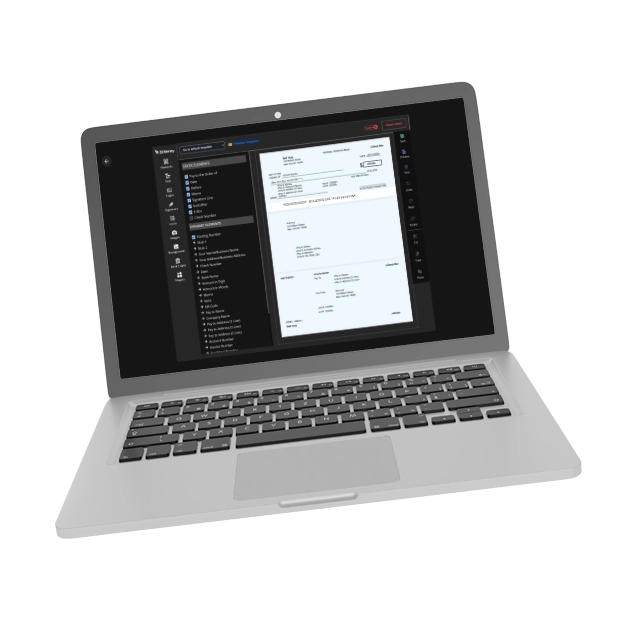
A Laptop Screen Shows Design Check Interface. QuickBooks Check Printing Choose Design Enter Information

Customize Your Checks for a Professional Touch

The drag-and-drop design tool allows checks to be personalized with logos, fonts, and images. Create custom checks that reflect the brand’s personality and professionalism with ease.

A Laptop Screen Shows Design Check Interface. QuickBooks Check Printing Choose Design Enter Information

Affordable Check Mailing Service

Send checks quickly and affordably for just $1.25, with printing, mailing, and delivery handled via USPS/FedEx. Ensure your checks are received the same business day at a cost-effective price.

An Image that Shows A Mailbox. Affordable Check Mailing Service. QuickBooks Check Printing Choose Design Enter Information

Why Zil Money!

A technology-first approach
to payments and finance

Easy to Access

High Security

Easy Payment

A Man Using A Phone to Make a Payment Easily, QuickBooks Check Printing Choose Design Enter Information

Support for Multiple Payment Methods

Need to print checks, process ACH, send eChecks, or use wire transfers? Enjoy the flexibility to handle all your payment needs from one convenient solution.

A Man Using A Phone to Make a Payment Easily, QuickBooks Check Printing Choose Design Enter Information
Opens sign up form in a modal dialog
Book a Demo

Frequently asked questions

FAQ Section
How to print QuickBooks checks?
Integrate QuickBooks with Zil Money to import, customize, and print checks on blank stock paper or plain white paper from anywhere using any printer. With Zil Money you can easily customize checks by adding logos, unique font style and background images.
How to print payroll checks on QuickBooks online?
You can print checks directly from QuickBooks. However, QuickBooks only prints the payee, amount, and date on pre-printed vouchers or 3-part checks. This means the check will have all the information needed to be processed. If you want to print checks on blank check stock with your bank account and routing number, you can integrate your QuickBooks account with Zil Money. Zil Money integrates well with QuickBooks Online, making it easy to import and print checks.
Can I print checks on regular paper?
Yes, you can print checks on regular paper. Zil Money allows you to print checks on-demand using blank check paper or even regular paper. This eliminates the need for ordering pre-printed checks and waiting for their delivery.
Check Printing and Mailing Service
With Zil Money, you can create and print checks instantly, eliminating the need for pre-printed checks. The platform also provides the option to mail checks at an affordable rate via USPS or FedEx.

Every Customer Review
is a Story of Trust

"
During a cash shortage while waiting for clients to pay me, Zil Money let me put my payroll on my credit card. It provided a bridge so my business did not suffer. It was super easy to set up and use.